jenkins
Jenkins is a CI service that can build and test software from different VCS, run automation tasks, integrate with ansible and much more, it’s based around the concept of builds, builds are composed of a sequence of actions that are executed on build nodes, build notes are enivronments that run the software build workflow
Jenkins pipelines
Pipelines are a sequence of steps that a Jenkins system performs, they can be defined from the web UI or in an SCM system through a Jenkinsfile. There are 2 ways of writing a Jenkinsfile, through a declarative syntax or a scripted syntax
Pipelines are made of stages that are collections of steps. A stage represents a logical group of actions that the worker has to do, for example build or test, where a step is the single action that a worker has to perform to do a certain job, for example:
sh: makeThis runs the make command
Agent section
Is a section where worker parameter are defined, this parameters influence the process of pipeline assignment to workers, for example:
agent { label 'my-label1' }this one targets a worker with the
my-label1label
possible parameters for the agent section are:
anynonelabeldockerdockerfilekubernetesspawn worker as a kubernetes pod deployed on kubernetes cluster
Credentials handling
Credentials configured in Jenkins can be referenced by the credentials() function
note this credentials are masked in the job log
Bash variable expansion vs groovy string interpolation
Variables can be interpolated using groovy GStrings (using ""), in this case parameters are expanded before the command is sent to the agent, exposing secrets, so this
pipeline {
    agent any
    environment {
        API_TOKEN = credentials('example-token-id')
    }
    stages {
        stage('Example') {
            steps {
                /* WRONG */
                    sh "curl -H 'Authorization: Bearer ${API_TOKEN}' https://example.com"
                """
            }
        }
    }
}
🔴 Error
will expose the secret to
pscommand on the agent
Error handling
Error handling can be done using the post block, that define action that are executed at the end of the pipeline, based on conditional logic on the pipeline state
🔷 Note
the post block is available only in declarative syntax
pipeline {
    agent any
    stages {
        stage('Test') {
            steps {
                sh 'make check'
            }
        }
    }
    post {
        always {
            junit '**/target/*.xml'

        }
        failure {
            mail to: team@example.com, subject: 'The Pipeline failed :('
        }
    }
}
Parallel execution on multiple agents
Jenkins allow a pipeline to run on multiple hosts, for example
pipeline {
    agent none

    stages {

        stage('Build') {
            agent any
            steps {
                checkout scm
                sh 'make'
                stash includes: '**/target/*.jar', name: 'app'
            }
        }
        stage('Test on Linux') {
            agent {
                label 'linux'
            }
            steps {
                unstash 'app'
                sh 'make check'
            }
            post {
                always {
                    junit '**/target/*.xml'
                }
            }

        }
        stage('Test on Windows') {
            agent {
                label 'windows'

            }
            steps {

                unstash 'app'
                bat 'make check'
            }
            post {
                always {
                    junit '**/target/*.xml'
                }
            }
        }
    }
}
This pipeline will run the test stage on 2 different agents (one with label linux and another one with label widows ), pipelines could also run in parallel on 2 different nodes using the parallel keyword
stage('Build') {
    /* .. snip .. */
}

stage('Test') {
    parallel linux: {
        node('linux') {
            checkout scm
            try {
                unstash 'app'
                sh 'make check'

            }
            finally {
                junit '**/target/*.xml'
            }

        }
    },
    windows: {
        node('windows') {
            /* .. snip .. */
        }
    }

}
Create a Jenkins CI pipeline for github repository
One way to use Jenkins is to run build processes for github hosted software as a substitute of github actions, in this setup github will trigger with a webhook the Jenkins instance in order to run a build defined in a Jenkinsfile inside the repo, events that triggers the CI pipeline can be specified in the github repo config section
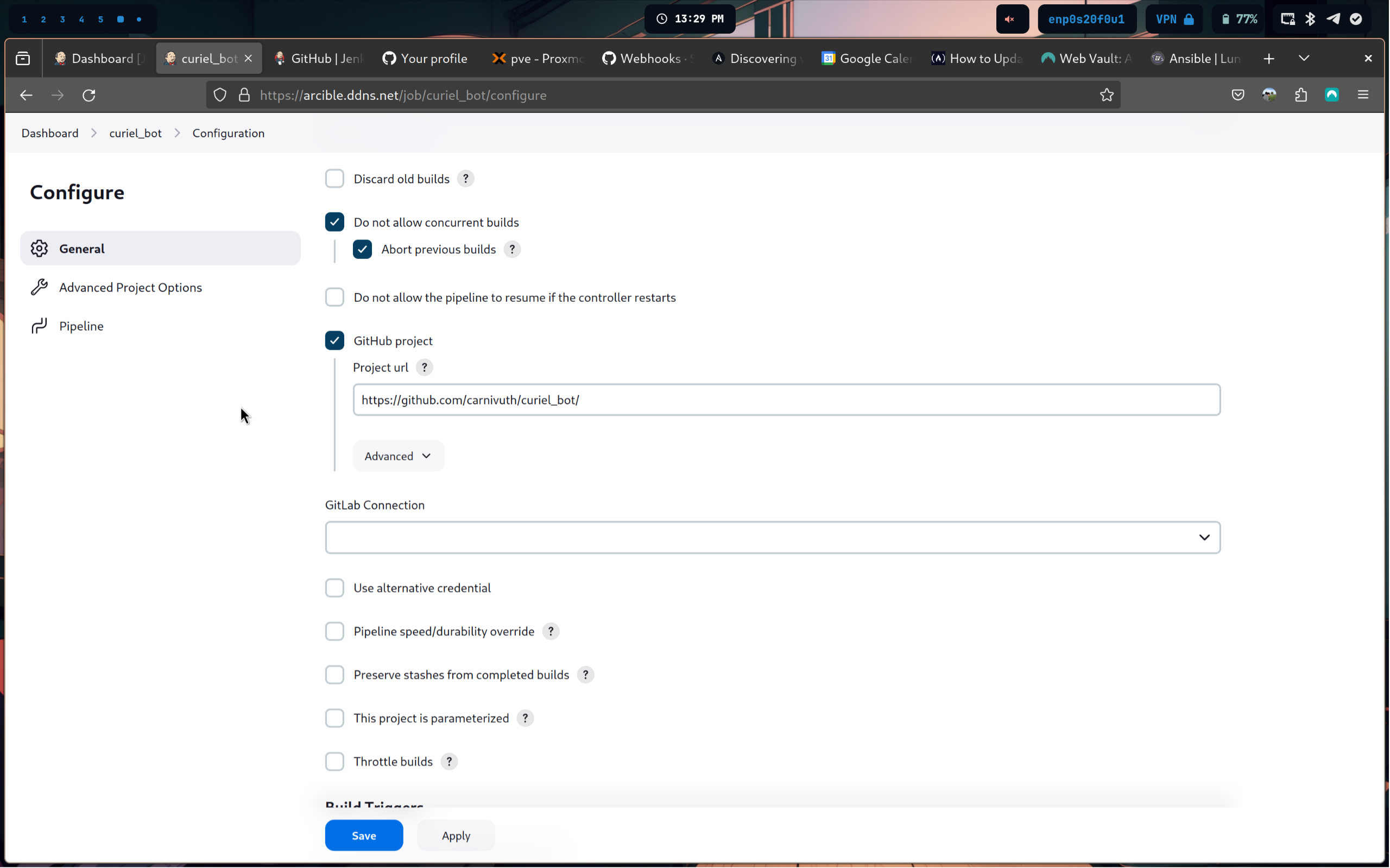
- Create a new pipeline on Jenkins and add a GitHub repository url
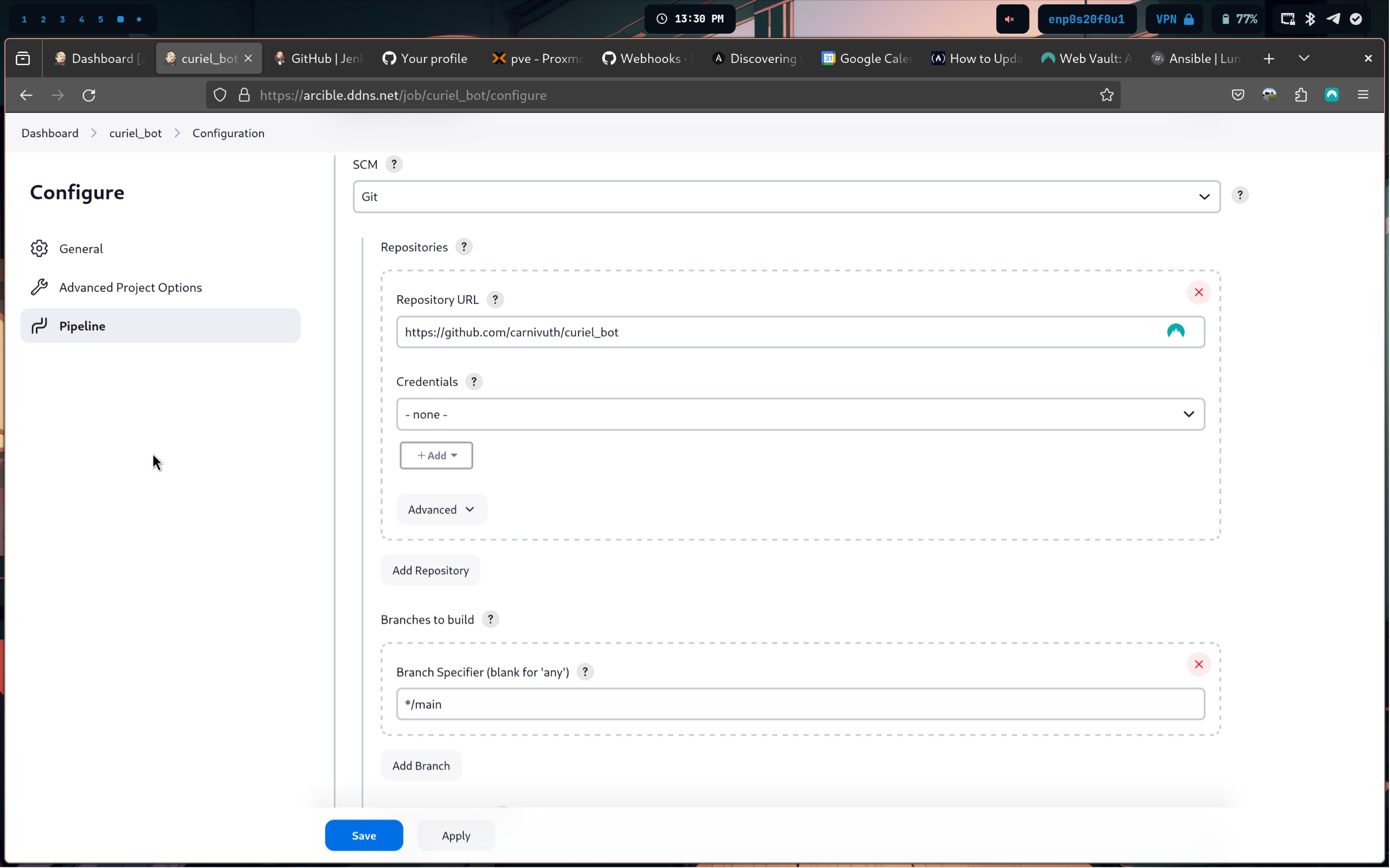
- Set the CI script to pull from SCM
- Create a
Jenkinsfilewith the Jenkins CI pipeline (here example for building docker images)
pipeline {
	environment {
		registry = "carnivuth/<project_name>"
		registryCredential = 'dockerhub_id'
		dockerImage = ''
	}

	agent any
	stages {
		stage('Cloning Repository') {
			steps {
				git branch:'main',
				    url:'https://github.com/carnivuth/<project_name>'
			}
		}

		stage('Building <project_name> docker image') {
			steps {
				script {
					dockerImage = docker.build registry + ":$BUILD_NUMBER"
				}
			}
		}

		stage('Upload docker image to docker hub') {
			steps {
				script {
					docker.withRegistry('', registryCredential) {
						dockerImage.push()
					}
				}
			}
		}

		stage('Cleaning up environment') {
			steps {
				sh "docker rmi $registry:$BUILD_NUMBER"
			}
		}
	}
}- Configure Jenkins to add GitHub hooks automatically to the repository